Mobile app for staffComing soon to the App Store and Google Play
Secure and convenient shift management
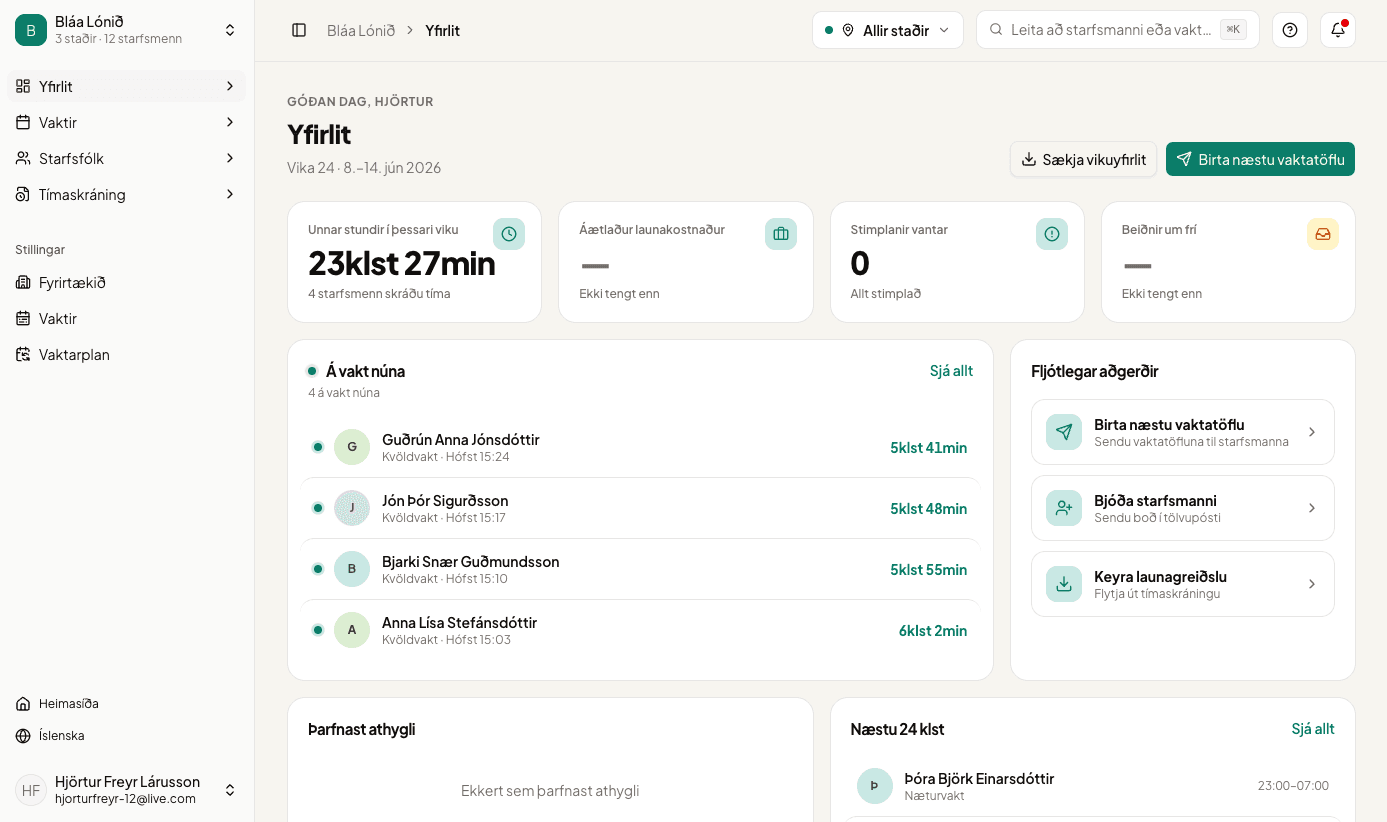
Plan shifts, track attendance and give your staff an overview of their own working hours — all in one place. Timr is designed for companies that want to simplify daily tasks and save time.
Ready to simplify shift scheduling?
Ástæðan fyrir því að ég lagði af stað í þessa vegferð er einföld: Ég hef bæði verið starfsmaður og yfirmaður og unnið með Excel við vaktaskipulag. Þegar ég fór að skoða önnur kerfi sem gætu leyst Excel af hólmi fann ég ekki réttu lausnina. Annað hvort voru sambærileg kerfi of dýr, buðu ekki upp á það sem okkur vantaði eða virkuðu einfaldlega ekki.
Þess vegna bjó ég til Timr: Forrit með einfaldri verðskrá, eiginleikum sem nýtast fyrirtækjum af öllum stærðum og einföldu viðmóti fyrir stjórnendur og starfsfólk.
Features
What can Timr do for you?
Timr is designed to simplify shift scheduling and time tracking — for both managers and employees.
- Shift plans
- Flexible shift patterns like 2-2-3, 5-5-4 or custom. Multiple plans running simultaneously.
- Time clock & time tracking
- Overview of all employee time entries. Edit entries or add them manually.
- Vacation & time-off system
- View time-off requests and approve or reject. An employee can't be scheduled on an approved day off.
- GPS verification
- Ensure employees clock in at the right location with geofencing.
- Notifications & alerts
- Employees get an email reminder before shifts and when a schedule is published. Managers get an email when someone clocks out away from the workplace.
- Data export
- Export time entries and payroll data to Excel.
- Labor cost
- See the period's labor cost as you go: regular, premium, overtime and holiday pay calculated from each person's hourly rate.
- Shift publishing
- Create shifts as drafts and publish when ready. Employees only see published shifts.
Pricing
Find the right fit
Start today with a 30-day free trial. No commitment.
Timr for your team
Free for the smallest teams. Drag the slider to your headcount as you grow — the price updates instantly.
- Shift planning & publishing
- Time clock with GPS verification
- Vacation & leave management
- Multiple locations
- Multiple managers
- Excel export for payroll
- Icelandic collective agreements
- Employee app
- Shift swaps & open shifts
- Payroll system sync
- Automatic shift assignment
- Detailed reporting
- AI Connections
Frequently asked questions
- Can I try the system for free?
Yes, you can try Timr for 30 days without providing credit card information. No commitment and you can cancel at any time.
- How many employees can I register?
Pricing follows your team size — pick a step by headcount, from a free tier for the smallest teams up to unlimited employees, and every paid step includes every feature.
- Is there an app for employees?
The employee app is coming to the App Store and Google Play. Until it lands, employees use Timr in their phone's browser — they can see their shifts, clock in and out, and get an email when a new schedule is published.
- Does the system account for Icelandic collective agreements?
Yes, Timr is built specifically for Icelandic workplaces. It automatically sorts hours into regular, premium, overtime and public-holiday time according to your collective agreement, and calculates pay from each employee's hourly rate and the agreement's percentages.
- Can I change plans later?
Yes, you can change plan size at any time. The new size takes effect immediately, but the new price applies from your next bill — nothing is charged or refunded when you switch between paid steps. Moving from the free tier to a paid one charges the first payment straight away.
- How does GPS clock-in work?
When an employee clocks in, the system verifies they are within a defined GPS radius of the workplace. The manager sets the location and allowed radius in settings. If the employee is outside the radius, the clock-in is rejected.